Prompt page
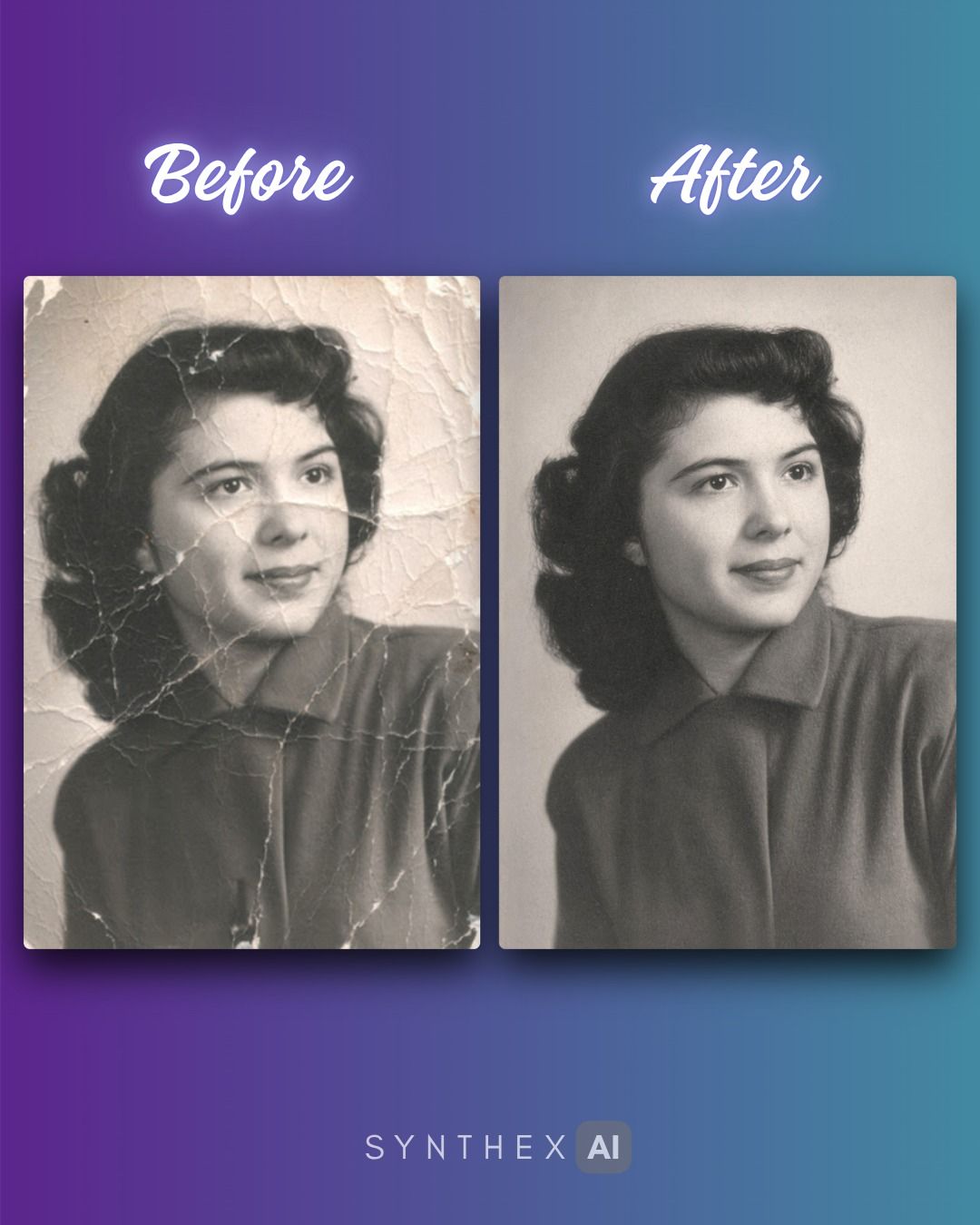
Restore Damaged Photographs
Prompt
Restore this damaged photograph as faithfully as possible. Preserve the original people, facial identities, expressions, clothing, pose, background, lighting, camera angle, composition, and historical era. Do not modernize the image, beautify the subjects, change hairstyles, change clothing, alter body shape, or invent new details. Repair visible damage: scratches, dust, stains, tears, fold marks, faded areas, discoloration, small missing patches, and surface wear. Reconstruct damaged areas conservatively based only on the surrounding visual context. Keep the restored image looking like the same original photograph, just carefully cleaned and repaired. Preserve natural skin texture, realistic film grain, original depth of field, and authentic photographic softness. Avoid plastic smoothing, over-sharpening, AI-looking faces, exaggerated contrast, painterly effects, or a newly generated look. If the image is black and white, keep it black and white unless I specifically ask for colorization. If it is color, restore natural color balance without making it look modern or overly saturated. No extra objects, no extra people, no added text, no watermark.
Model
ChatGPT